How to play Minesweeper
Minesweeper takes five minutes to learn and a good while to master. This guide covers everything you need for your first win: the goal, what the numbers mean, how flags work and how to clear a board without guessing.
How Minesweeper works, in short. Click any square to start. Every number tells you how many mines touch that square, diagonals included. Use the numbers to work out where the mines are and mark them with a flag (right-click, or hold your finger on a phone). Open every square that isn't a mine and you win. Click a mine and it's game over.
The goal of the game
The board is a grid of closed squares. Some of them hide mines. You win by opening every square that doesn't.
That's really all there is to it. You don't even have to flag the mines to win. Flags are notes for yourself, so you don't click a mine by accident.
How many mines are there? That depends on the level. Beginner hides 10 mines in 81 squares and Expert hides 99 in 480. The red counter in the top left shows how many are still left to find.
Your first click
You have nothing to go on yet, so just click a square. Anywhere is fine.
The first click is always safe. In our game the mines are only placed after you click, and never on that square or right next to it. So your first click always opens up a patch of the board, with numbers along its edge.
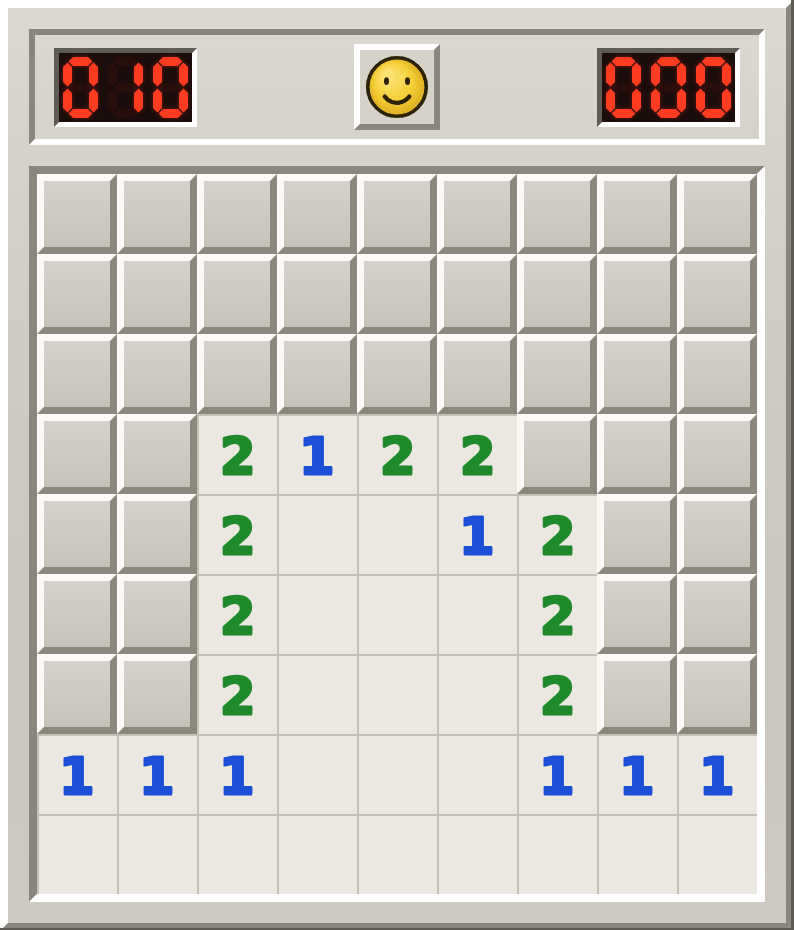
Why did one click open so much? An open square without a number has no mines around it. The game knows its neighbors are safe and opens them for you. It keeps going until it reaches squares that do have a number.
What the numbers mean
A number tells you how many mines are hidden in the eight squares around it: above, below, left, right and the four corners. Yes, the diagonals count too. That's the rule beginners forget most often.
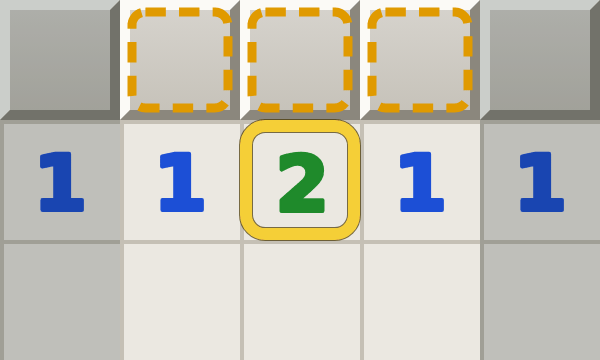
An open square without a number is a zero. No mines touch it.
Each number has its own color, just like in the classic Windows game. 1 is blue, 2 is green, 3 is red and 4 is dark blue. Then come 5 in maroon, 6 in teal, 7 in black and 8 in gray. You won't see a 7 or an 8 very often: that means almost every neighbor is a mine.
How to flag a mine
Once you're sure a square hides a mine, put a flag on it. On a computer you right-click the square. On a phone or tablet you hold your finger on it for a moment. Do the same again to take the flag off.
When can you be sure? The easiest case is a number with exactly as many closed squares around it as its value. A 1 with only one closed neighbor, or a 2 with two. Every one of those squares is a mine.
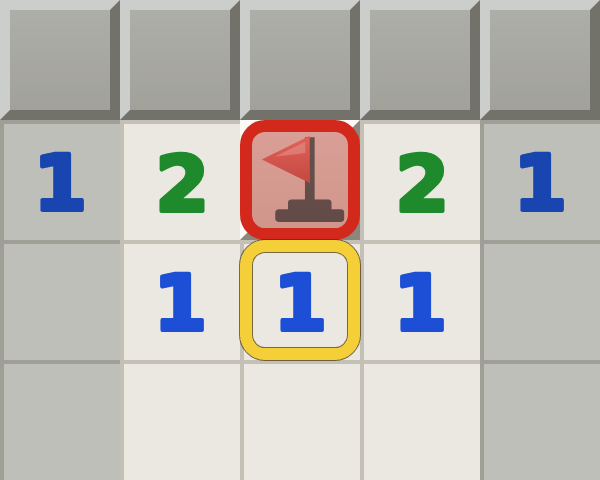
Flags stop you from opening a mine by accident, and they make counting easier. Just don't flag on a hunch. A wrong flag will mislead you later in the game.
No mouse? On most laptops a two-finger tap or click on the touchpad works as a right-click. On a laptop with a touchscreen you can also switch the Dig button in our top bar to Flag. Then every click plants a flag, and holding the button down opens a square.
Open several squares at once
This is the move that makes good players fast. When a number already has all of its mines flagged, every other square around it is safe. Click the number itself and the game opens all of those squares in one go.
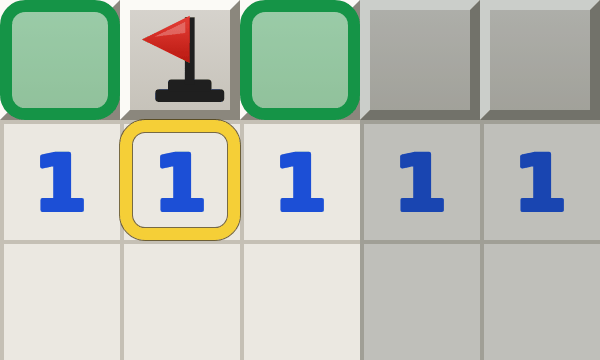
Old hands call this chording. In the classic game you pressed both mouse buttons at the same time. That works here too, and so does the middle mouse button.
One warning: chording trusts your flags. If one of them is wrong, you'll open a mine.
Your first game, step by step
- Start on Beginner. It has 9 × 9 squares and 10 mines, small enough to see everything at once.
- Click in the middle. The board opens up.
- Walk along the edge of the open area. Look for a number with exactly as many closed squares around it as its value. Flag those squares.
- Check the numbers next to your new flags. A number that has all its flags tells you the rest of its neighbors are safe. Open them, or click the number.
- Repeat. Every square you open gives you new numbers to work with.
- Stuck? Look at two numbers side by side. Together they often tell you more than each one does alone. Our page on Minesweeper patterns shows the shapes to look for, and the Hint button in the game shows you the next move and explains why it works.
The counter, the timer and the smiley
The red counter on the left shows the number of mines minus the flags you've planted. If it drops below zero, you've planted too many flags and at least one of them is wrong.
The timer on the right starts with your first click and stops when you win or lose.
Click the smiley to start a new game. It reacts to your moves too, so keep an eye on its face while you play, and especially when you win.
Levels and board sizes
| Level | Board | Mines |
|---|---|---|
| Beginner | 9 × 9 | 10 |
| Intermediate | 16 × 16 | 40 |
| Expert | 30 × 16 | 99 |
These are the classic Windows sizes. The early versions had a slightly smaller Beginner board of 8 × 8, and the official world rankings still use that one.
Google's version of Minesweeper uses its own sizes: Easy is 10 × 8, Medium 18 × 14 and Hard 24 × 20. You can play those on our Google Minesweeper page.
All the controls
On a computer
| Left click | Open a square |
|---|---|
| Right click | Plant or remove a flag |
| Click a number | Open all squares around it once it has the right number of flags |
| Both buttons or middle button | The same, the classic way |
| Space | Flag the square under your mouse, or open around a number |
| F2 or N | New game. Once a game is over, Enter works too. |
| H | Show a hint |
| Arrow keys and Enter | Play without a mouse. Click the board or tab to it first. |
On a phone or tablet
| Tap | Open a square, or open around a number that has all its flags |
|---|---|
| Hold | Plant or remove a flag |
| Dig and Flag button | Switch what a tap does. In Flag mode a tap plants a flag and holding opens a square. |
Common beginner mistakes
Forgetting the diagonals
A number counts all eight squares around it. When a position seems impossible, there's usually a diagonal square you skipped.
Guessing too soon
Feeling stuck often just means you haven't looked at two numbers together yet. On this site every board can be solved without guessing, so a safe move is always there somewhere.
Flagging on a hunch
A flag should mean "I'm sure." A wrong flag does no harm on its own, but every move you build on it can.
Rushing the last few squares
Losing a game that was nearly done hurts the most. Slow down near the end: a few extra seconds cost less than starting over.
Is Minesweeper hard?
The rules are easy. Getting good takes practice. You can clear most Beginner boards with nothing more than the two simple rules above: a number with just enough closed squares, and a number that already has its flags.
Intermediate and Expert ask more. You'll need to combine numbers and spot patterns, and on Expert about one square in five is a mine.
The good news is that you improve fast. After a few games you stop counting and start recognizing shapes. That's usually when Minesweeper gets hard to put down.
Questions and answers
What happens if you click a mine?
The game is over. All the mines are shown, any wrong flags get a red cross and the smiley looks rather unhappy. Click it to try again.
Do you have to flag every mine to win?
No. You win as soon as every safe square is open. Flags are optional, and many fast players hardly use them.
What does an empty square mean?
It's a zero: none of the eight squares around it hides a mine. That's why the game opens them all for you.
Can you win every game of Minesweeper?
On this site, yes. Every board can be solved with logic alone. In the classic Windows game and in Google's version some boards force you to guess, so even perfect play loses quite a few games, especially on Expert. Read more about no-guess Minesweeper.
Can I put a question mark on a square?
Some old versions let you right-click a second time to mark a square with a question mark. This version keeps it simple: a square has a flag or it doesn't.
What's the best way to get better?
Play Beginner until you win most games, then move up a level. When you're stuck, press Hint: it shows the next move and explains the reasoning, so you pick up the patterns as you play. Games where you used a hint can't set a best time, so there's no pressure.
Ready for your first game?
Play Minesweeper